

The top menu
The menu at the top of every page has:- Home, with a count of the things that need you.
- Orders: see Track your order status.
- Estimates: see Find your estimates.
- Invoices, for people with the Finance or Admin role: see Invoices and payment.
- Messages, with a count of unread messages.
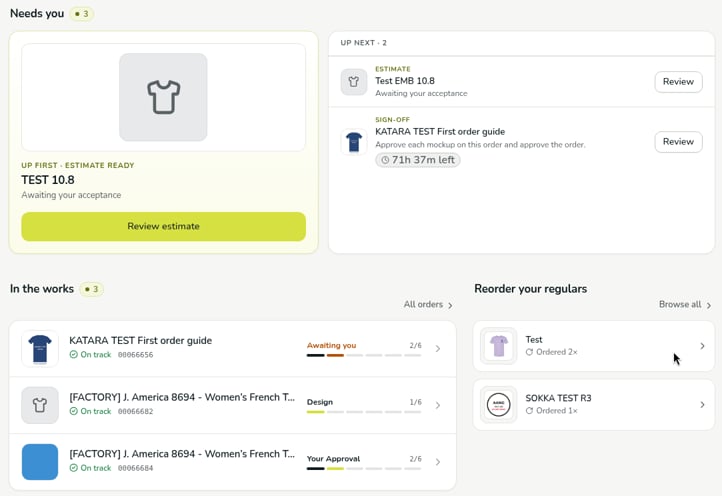
Needs you
Needs you lists everything waiting on you, with a count, such as an estimate to review or an order to sign off. If nothing is waiting, it says You’re all caught up.- The first item is featured as Up first, with a button to act on it, such as Review estimate.
- Further items are listed under Up next, each with a Review button.
- An order waiting for your sign-off shows how long you have left, for example 71h 37m left. See Review and approve your order.
In the works
In the works lists your orders in progress, with a count. Each order shows its name and number, whether it’s On track, its current stage (for example Design, Your Approval, or Awaiting you when your approval is needed), and how far along it is, such as 2/6: the order’s step out of the six stages from Design to Complete. Select an order to open it, or select All orders to see every order.Reorder your regulars
Reorder your regulars lists designs you order often, with how many times you’ve ordered each, for example Ordered 2×. To repeat an order, see Reorder a past order.Verified against DEKHQ 41df3d0 on 2026-10-09