

You need the Order or Admin role to approve or decline an order. See Roles and permissions.
Check your sign-off status
The Sign-off tile on your order’s page shows where things stand:- Not yet due: your decorator’s art team is still preparing your artwork and proof. There’s nothing for you to do yet.
- Approved: you’ve signed off, and the order is cleared for production.
What’s on the sign-off page
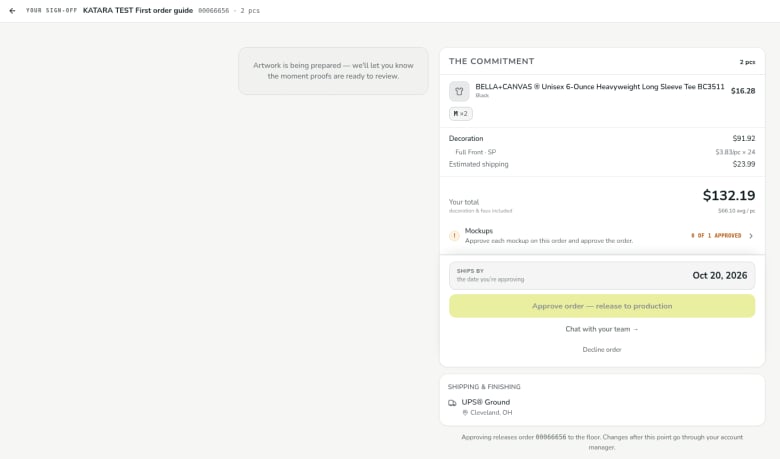
- Artwork status. While the art team is still working, the page says Artwork is being prepared — we’ll let you know the moment proofs are ready to review.
- The Commitment. A summary of what you’re agreeing to: each product with its sizes and price, the decoration, estimated shipping, and Your total (decoration and fees included), with the average cost per piece.
- Mockups. Shows how many of the order’s mockups you’ve approved, for example 0 of 1 approved, with the reminder Approve each mockup on this order and approve the order.
- Ships by. The ship-by date you’re agreeing to when you approve, labeled the date you’re approving.
- Approve order — release to production. Approves the order. The button stays unavailable until everything the page is waiting on is done, such as approving each mockup.
- Chat with your team →: message your decorator’s team if you have questions before you approve.
- Decline order: decline the order instead of approving it.
- Shipping & Finishing. How the order ships and where it’s going.
This page doesn’t yet cover reviewing individual proofs. That part of the guide is coming soon.
Related
Verified against DEKHQ 41cdde7 on 2026-10-09