> ## Documentation Index
> Fetch the complete documentation index at: https://docs.dekhq.com/llms.txt
> Use this file to discover all available pages before exploring further.
# Reorder a past order
> Start a new order from one you've placed before, with the same products and artwork, then enter new quantities.
A reorder starts a new order from a past one. Your products and decorations carry over, so you only need to enter quantities, check shipping, and submit.
You need the **Order** or **Admin** role to reorder. See [Roles and permissions](/help/guides/roles-and-permissions).
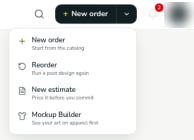
Open the **More ways to order** menu (the arrow next to **+ New order**) and choose **Reorder**.
 Some orders also have a **Reorder** button, on the order's card in **Orders** and on the order's page. It opens the reorder with that order already selected, so you can skip to step 3.
On **Search for an Order to Reorder**, type an order number or PO number. Results appear as you type. To narrow the results by date, fill in **From** and **To**.
Each result shows the order number, its status, the job name, the PO number, the number of items, the price, and the date, with thumbnails of the artwork. Select the order you want.
The order builder opens with the past order's products and decorations already in place.
Some orders also have a **Reorder** button, on the order's card in **Orders** and on the order's page. It opens the reorder with that order already selected, so you can skip to step 3.
On **Search for an Order to Reorder**, type an order number or PO number. Results appear as you type. To narrow the results by date, fill in **From** and **To**.
Each result shows the order number, its status, the job name, the PO number, the number of items, the price, and the date, with thumbnails of the artwork. Select the order you want.
The order builder opens with the past order's products and decorations already in place.
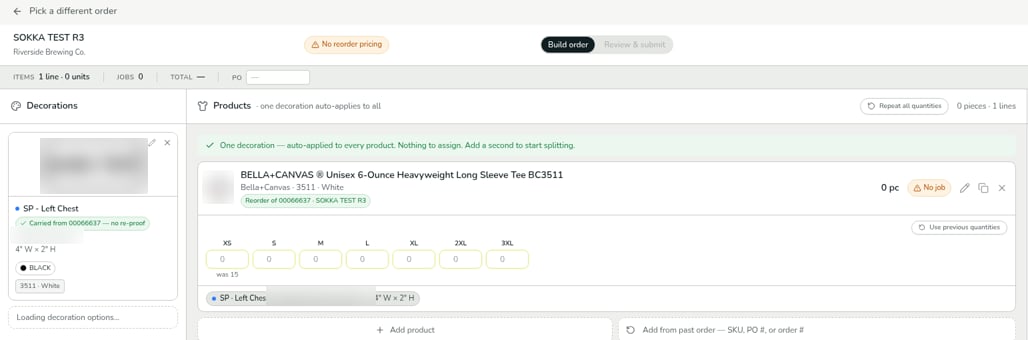 * Each product is labeled **Reorder of** the original order number and name.
* Each decoration is labeled **Carried from** the original order number **— no re-proof**. Your artwork was already approved on that order, so it doesn't need a new proof.
To start over with a different order, select **Pick a different order** at the top left.
The quantity boxes start empty. Under each size you ordered before, a hint shows the earlier quantity, for example **was 15**.
Type new quantities for each size. Each product also has a **Use previous quantities** button.
Select **Continue to Review →** and finish the order the same way as a new one. See the last step of [Place your first order](/help/getting-started/place-your-first-order).
## Reorder pricing
Reorders can get lower pricing, such as a per-screen discount and waived digitizing. If the order you picked never went into production, you'll see a **No reorder pricing** badge at the top of the builder: reorder pricing doesn't apply, so the order is priced like a new one.
## Your reorder is saved as a draft
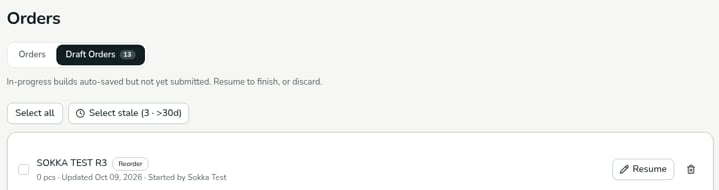
Your reorder is saved automatically under **Orders** > **Draft Orders**, marked **Reorder**. Select **Resume** to pick up where you left off, or delete the draft if you don't need it.
* Each product is labeled **Reorder of** the original order number and name.
* Each decoration is labeled **Carried from** the original order number **— no re-proof**. Your artwork was already approved on that order, so it doesn't need a new proof.
To start over with a different order, select **Pick a different order** at the top left.
The quantity boxes start empty. Under each size you ordered before, a hint shows the earlier quantity, for example **was 15**.
Type new quantities for each size. Each product also has a **Use previous quantities** button.
Select **Continue to Review →** and finish the order the same way as a new one. See the last step of [Place your first order](/help/getting-started/place-your-first-order).
## Reorder pricing
Reorders can get lower pricing, such as a per-screen discount and waived digitizing. If the order you picked never went into production, you'll see a **No reorder pricing** badge at the top of the builder: reorder pricing doesn't apply, so the order is priced like a new one.
## Your reorder is saved as a draft
Your reorder is saved automatically under **Orders** > **Draft Orders**, marked **Reorder**. Select **Resume** to pick up where you left off, or delete the draft if you don't need it.
 ***
Verified against DEKHQ 41cdde7 on 2026-10-09
This documentation is built and hosted on [Mintlify](https://mintlify.com), a developer documentation platform.
***
Verified against DEKHQ 41cdde7 on 2026-10-09
This documentation is built and hosted on [Mintlify](https://mintlify.com), a developer documentation platform.