> ## Documentation Index
> Fetch the complete documentation index at: https://docs.dekhq.com/llms.txt
> Use this file to discover all available pages before exploring further.
# Art library
> Find, filter, and pin the artwork your decorator has on file for your company.
Your **Art Library** holds every art file your decorator has on file for your company. Use it to find a design, check where it's been used, and pin the ones you use most.
## Open your art library
Select your initials in the upper right corner, then select **Art library**.
The top of the page shows how many files you have, broken down by decoration type (for example, **5 Screen Print** and **3 Embroidery**).
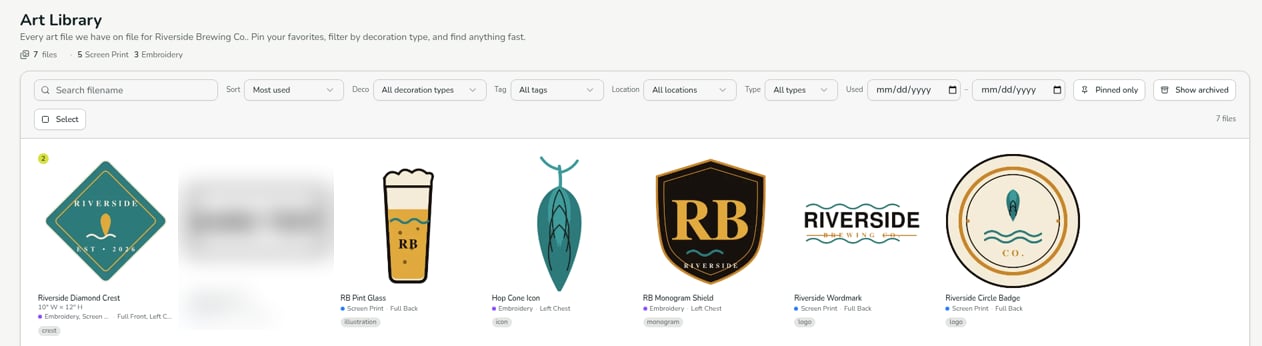 Each tile shows the artwork with its name, size, decoration type, print location, and any tags.
## Find artwork
Use the bar above the grid to narrow the list:
| Control | What it does |
| - | - |
| **Search filename** | Find a file by name. |
| **Sort** | Change the order, for example **Most used**. |
| **Deco** | Show one decoration type, such as Screen Print or Embroidery. |
| **Tag** | Show files with a tag. |
| **Location** | Show artwork used in one print location, such as Left Chest or Full Back. |
| **Type** | Filter by file type. |
| **Used** | Show artwork last used between two dates. |
| **Pinned only** | Show only the files you've pinned. |
| **Show archived** | Show archived files instead of your current ones. The button changes to **Showing archived**. Select it again to go back. |
| **Select** | Select several files at once. |
## Pin your favorites
Pin the files you use most, then turn on **Pinned only** to see just those.
**Resellers:** if you order on behalf of your own customers, your art library holds artwork for their brands as well as yours. That's expected: the library holds all the artwork used on your account, whoever's brand it is.
***
Verified against DEKHQ 41cdde7 on 2026-10-09
This documentation is built and hosted on [Mintlify](https://mintlify.com), a developer documentation platform.
Each tile shows the artwork with its name, size, decoration type, print location, and any tags.
## Find artwork
Use the bar above the grid to narrow the list:
| Control | What it does |
| - | - |
| **Search filename** | Find a file by name. |
| **Sort** | Change the order, for example **Most used**. |
| **Deco** | Show one decoration type, such as Screen Print or Embroidery. |
| **Tag** | Show files with a tag. |
| **Location** | Show artwork used in one print location, such as Left Chest or Full Back. |
| **Type** | Filter by file type. |
| **Used** | Show artwork last used between two dates. |
| **Pinned only** | Show only the files you've pinned. |
| **Show archived** | Show archived files instead of your current ones. The button changes to **Showing archived**. Select it again to go back. |
| **Select** | Select several files at once. |
## Pin your favorites
Pin the files you use most, then turn on **Pinned only** to see just those.
**Resellers:** if you order on behalf of your own customers, your art library holds artwork for their brands as well as yours. That's expected: the library holds all the artwork used on your account, whoever's brand it is.
***
Verified against DEKHQ 41cdde7 on 2026-10-09
This documentation is built and hosted on [Mintlify](https://mintlify.com), a developer documentation platform.