> ## Documentation Index
> Fetch the complete documentation index at: https://docs.dekhq.com/llms.txt
> Use this file to discover all available pages before exploring further.
# Your Home page
> Find your way around the DEKHQ portal: the top menu, your account manager, and the Home page sections that show what needs you and what's in progress.
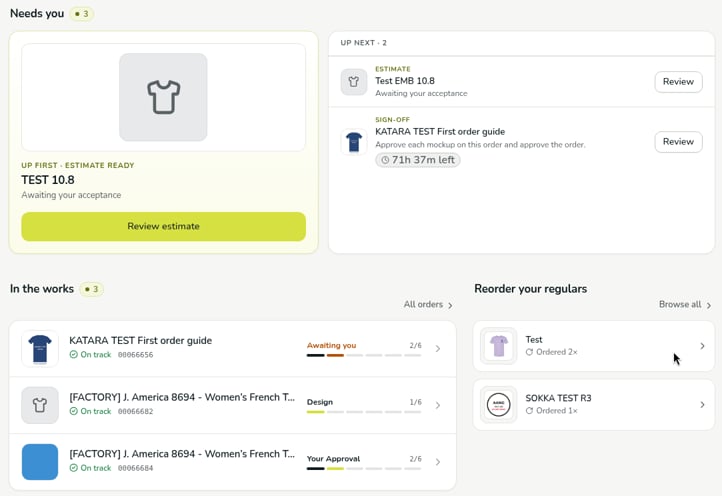
When you sign in, you land on **Home**. It shows what's waiting on you, what's in progress, and the orders you place most.
 ## The top menu
The menu at the top of every page has:
* **Home**, with a count of the things that need you.
* **Orders**: see [Track your order status](/help/guides/track-your-order).
* **Estimates**: see [Find your estimates](/help/guides/estimates).
* **Invoices**, for people with the Finance or Admin role: see [Invoices and payment](/help/guides/invoices).
* **Messages**, with a count of unread messages.
The center of the bar shows **Your account manager** and their name. On the right are search, **+ New order** (see [Place your first order](/help/getting-started/place-your-first-order)), notifications, and your initials. Select your initials to see your name and email, and to open **Account**, **Art library**, or **Sign out**.
## Needs you
**Needs you** lists everything waiting on you, with a count, such as an estimate to review or an order to sign off. If nothing is waiting, it says *You're all caught up.*
* The first item is featured as **Up first**, with a button to act on it, such as **Review estimate**.
* Further items are listed under **Up next**, each with a **Review** button.
* An order waiting for your sign-off shows how long you have left, for example **71h 37m left**. See [Review and approve your order](/help/guides/review-and-approve).
## In the works
**In the works** lists your orders in progress, with a count. Each order shows its name and number, whether it's **On track**, its current stage (for example **Design**, **Your Approval**, or **Awaiting you** when your approval is needed), and how far along it is, such as **2/6**: the order's step out of the six stages from Design to Complete. Select an order to open it, or select **All orders** to see every order.
## Reorder your regulars
**Reorder your regulars** lists designs you order often, with how many times you've ordered each, for example **Ordered 2×**. To repeat an order, see [Reorder a past order](/help/guides/reorder).
***
Verified against DEKHQ 41df3d0 on 2026-10-09
This documentation is built and hosted on [Mintlify](https://mintlify.com), a developer documentation platform.
## The top menu
The menu at the top of every page has:
* **Home**, with a count of the things that need you.
* **Orders**: see [Track your order status](/help/guides/track-your-order).
* **Estimates**: see [Find your estimates](/help/guides/estimates).
* **Invoices**, for people with the Finance or Admin role: see [Invoices and payment](/help/guides/invoices).
* **Messages**, with a count of unread messages.
The center of the bar shows **Your account manager** and their name. On the right are search, **+ New order** (see [Place your first order](/help/getting-started/place-your-first-order)), notifications, and your initials. Select your initials to see your name and email, and to open **Account**, **Art library**, or **Sign out**.
## Needs you
**Needs you** lists everything waiting on you, with a count, such as an estimate to review or an order to sign off. If nothing is waiting, it says *You're all caught up.*
* The first item is featured as **Up first**, with a button to act on it, such as **Review estimate**.
* Further items are listed under **Up next**, each with a **Review** button.
* An order waiting for your sign-off shows how long you have left, for example **71h 37m left**. See [Review and approve your order](/help/guides/review-and-approve).
## In the works
**In the works** lists your orders in progress, with a count. Each order shows its name and number, whether it's **On track**, its current stage (for example **Design**, **Your Approval**, or **Awaiting you** when your approval is needed), and how far along it is, such as **2/6**: the order's step out of the six stages from Design to Complete. Select an order to open it, or select **All orders** to see every order.
## Reorder your regulars
**Reorder your regulars** lists designs you order often, with how many times you've ordered each, for example **Ordered 2×**. To repeat an order, see [Reorder a past order](/help/guides/reorder).
***
Verified against DEKHQ 41df3d0 on 2026-10-09
This documentation is built and hosted on [Mintlify](https://mintlify.com), a developer documentation platform.